
Ask most multi-property hotel owners how confident they are in the number their portfolio dashboard shows for total payables, and the answer gets complicated fast. The total is right there on screen. What’s harder to verify is what happened underneath it: how a shared vendor invoice got split, coded, and reconciled onto each property’s books, and whether the payment went out correctly.
That gap – between a number you can see and one you can trust – is where real money leaks out of a growing portfolio, especially for groups running AP through spreadsheets with no formal approval workflow, or no system at all beyond each GM paying bills on their own. The fix is what Docyt calls portfolio bill pay: paying and reconciling invoices across every property from one place instead of hotel by hotel. Here’s how to get it right, and how Docyt does the work underneath each step.
Step 1: Split and Code Every Shared Invoice the Same Way
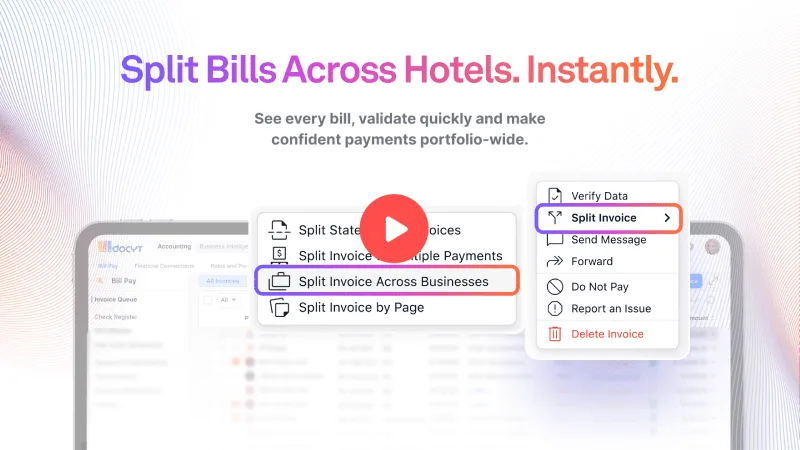
A landscaping vendor, linen supplier, or national account like US Foods or HD Supply will send one invoice covering a dozen properties at once. Someone has to figure out how much belongs to each hotel, code it to the right department, and enter it correctly before it can be paid. Done by hand, allocation errors flow straight into each property’s P&L.
Docyt’s AI reads every invoice the way a trained AP clerk would – extracting the relevant data like vendor name, invoice, and due dates, and every line item, not just the total. It learns from your historical data and patterns. For invoices spanning multiple properties, it applies the split logic you configure – by dollar amount, percentage, or department – and maps each portion to the correct chart of accounts automatically, referencing how that vendor was coded before so anything out of pattern gets flagged before it posts.
Step 2: Automate the Intercompany Entry, Not Just the Split
The moment one property’s share of a shared bill is allocated to another entity, that’s an intercompany transaction requiring a “due to / due from” entry on both sides of the balance sheet. Docyt generates and reconciles that entry automatically the moment it processes the split, not weeks later during close. SeeManaging 50+ Properties: Multi-Property Accounting Made Easy for a closer look at that consolidation work.
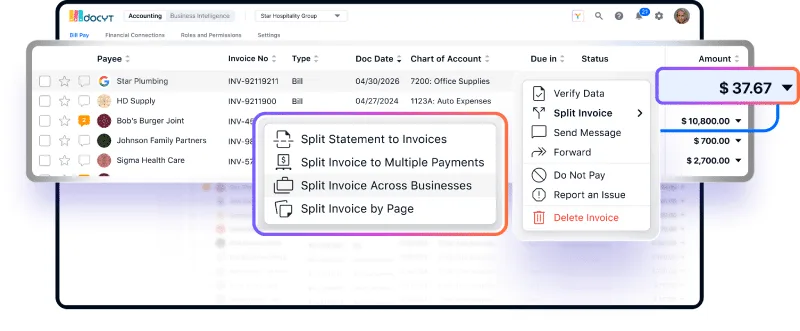
This comes with a guardrail: Docyt will consolidate payment for a shared vendor across properties that are actually related – seven hotels under one ownership group paying a single supplier once, for example – but it won’t let one property cover a bill for an entity outside that group. The automation follows your actual ownership structure rather than assuming every property under common ownership works the same way.
Step 3: Get the Payment Itself Right
Splitting and coding an invoice correctly doesn’t matter much if the payment still causes friction: a check that goes missing, an ACH that gets misrouted, or a vendor paid twice. Docyt supports and tracks every payment method a hotel uses – ACH, a mailed check with USPS tracking, or one you print yourself – and money always moves from the correct operating account. Its AI also checks bank and card feeds against invoices in the queue, and if a bill was already paid on a card or autopay, it matches the two and marks it paid instead of leaving it open to be paid twice.
Step 4: Turn Vendor Data Into Benchmarking
Once every property splits and codes the same vendor’s invoices the same way, benchmarking becomes possible: if three hotels pay different rates to the same regional vendor, that gap surfaces as a signal instead of something someone catches by hand. Docyt’s 10-Minute Bill Pay covers how faster approvals capture early-payment discounts; getting the split and payment right first adds a second lever – trusting what you’re paying in the first place.
Step 5: Build Approval That Scales
A general manager should see exactly what’s pending for their property, no more. A portfolio-level approver gets the full working queue instead: filter to one vendor across every property, select all, and generate every payment in one pass. Approval routes automatically based on property, vendor, and dollar amount, and the screen loads the extracted data and PDF immediately, so approving takes seconds.
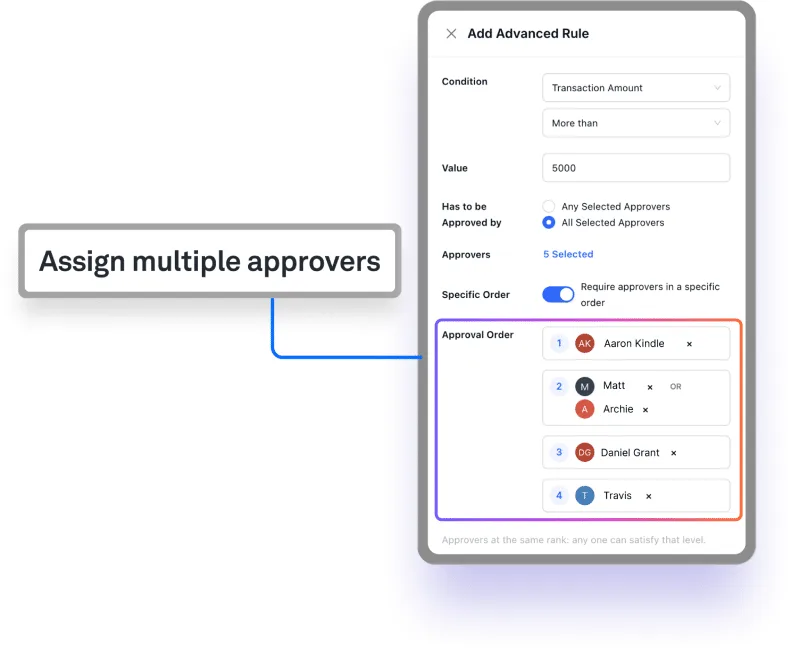 For portfolios that need more than one path, Approval Rules build a custom process triggered by invoice amount, vendor type, department, or property, with multiple approvers in a defined order – a department head first, then a controller, then an owner above a set threshold. A bill won’t move to payment until it clears every sign-off in that sequence, so the right eyes review every payment without one person becoming the bottleneck.
Step 6: Handle 1099s Without a January Scramble
Because Docyt already has each vendor’s tax classification, payment totals, and entity attribution on file from every invoice processed all year, it generates and sends 1099s automatically at year-end, matched to whichever entity actually paid the vendor.
Why This Belongs in Your Business Intelligence Toolkit
Splitting, coding, paying, intercompany reconciliation, and spend benchmarking turn accounts payable from a payment function into a live signal about where the portfolio’s money is going. Forrester’s latest review of the accounts payable automation market found vendors moving quickly from basic invoice capture toward autonomous exception handling – a sign finance leaders now expect this as standard.
See It for Your Own Hotel Portfolio
If you want to know not just what your portfolio owes, but whether that number is one you can trust, the fastest way is to see it against your own invoices, vendors, and entity structure.
Book a demo with Docyt and see how the splitting, payment, reconciliation, and benchmarking work underneath your own portfolio’s payables.